

We’ve noticed that many Magento 2 developers face difficulties when trying to create UI component grid and form in the admin panel.
In this tutorial, we will show you how to
- Create UI component grid and
- Create UI component form
- CRUD operations such as save, delete, update, massStatus, massDelete records
Here is the step-by-step process to create UI component grid and form from scratch in Magento 2.
1. Activate Module
Create The Module Configuration File Named Module.Xml
Create app/code/Thecoachsmb/Grid/etc/module.xml file
<?xml version="1.0"?>
<config xmlns:xsi="http://www.w3.org/2001/XMLSchema-instance" xsi:noNamespaceSchemaLocation="urn:magento:framework:Module/etc/module.xsd">
    <module name="Thecoachsmb_Grid" setup_version="1.0.0">
    </module>
</config>
Create Registration.php file for registering module
Create app/code/Thecoachsmb/Grid/registration.php file
<?php
\Magento\Framework\Component\ComponentRegistrar::register(
    \Magento\Framework\Component\ComponentRegistrar::MODULE,
    'Thecoachsmb_Grid',
    __DIR__
);
2. Create Route file routes.xml
Now, the next step is to add an admin router of the module. For that, we need to create a routes.xml file In app/code/Thecoachsmb/Grid/etc/adminhtml/routes.xml
<?xml version="1.0"?>
<config xmlns:xsi="http://www.w3.org/2001/XMLSchema-instance" xsi:noNamespaceSchemaLocation="urn:magento:framework:App/etc/routes.xsd">
    <router id="admin">
        <route id="thecoachsmb" frontName="thecoachsmb">
            <module name="Thecoachsmb_Grid" before="Magento_Adminhtml"/>
        </route>
    </router>
</config>
3. Create Menu for our custom module in Admin Panel
Next, we will have to add link in admin menu for which we need to create menu.xml
Create app/code/Thecoachsmb/Grid/etc/adminhtml/menu.xml file
Menu Name – Thecoachsmb
Sub-Menu Name – Articles
<?xml version="1.0"?>
<config xmlns:xsi="http://www.w3.org/2001/XMLSchema-instance" xsi:noNamespaceSchemaLocation="urn:magento:module:Magento_Backend:etc/menu.xsd">
    <menu>
    	<add id="Thecoachsmb_Grid::gridmanager" title="Thecoachsmb" module="Thecoachsmb_Grid" sortOrder="10" resource="Thecoachsmb_Grid::gridmanager"/>
    	<add id="Thecoachsmb_Grid::create" title="Grid Manager" module="Thecoachsmb_Grid" sortOrder="20" parent="Thecoachsmb_Grid::gridmanager" action="thecoachsmb/grid/index" resource="Thecoachsmb_Grid::create"/>
    </menu>
</config>
Clear cache : php bin/magento c:f
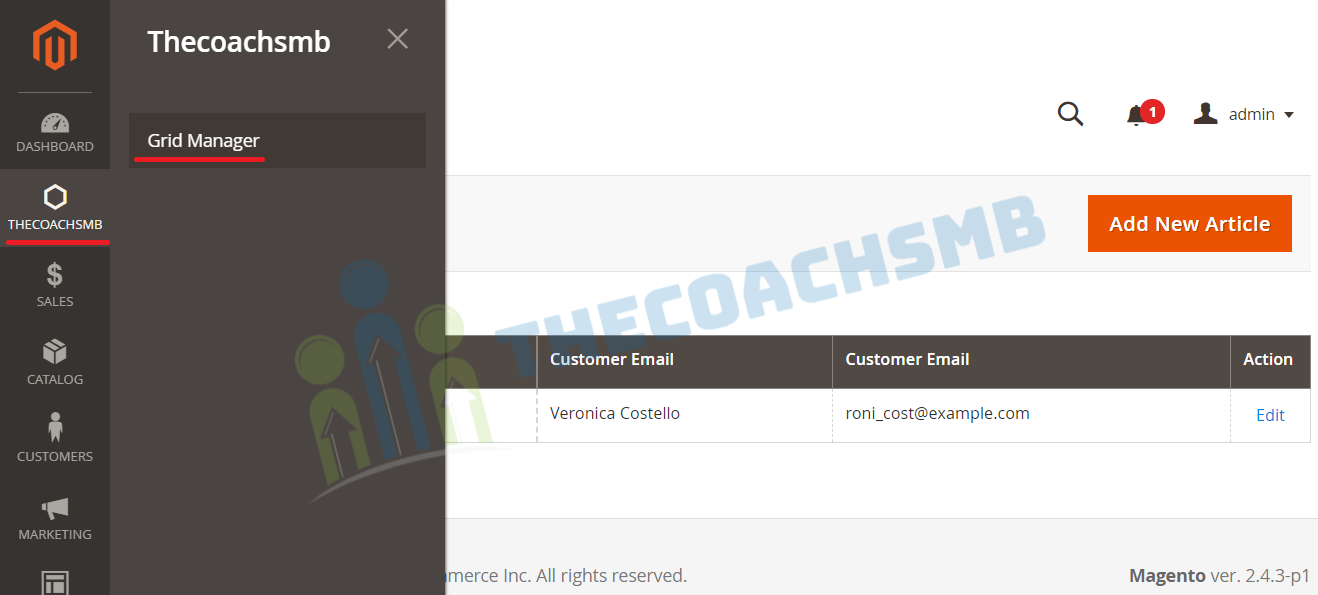
Refresh the Admin Panel, you should see Menu as shown below.
4. Create Table
Create app/code/Thecoachsmb/Grid/etc/db_schema.xml file
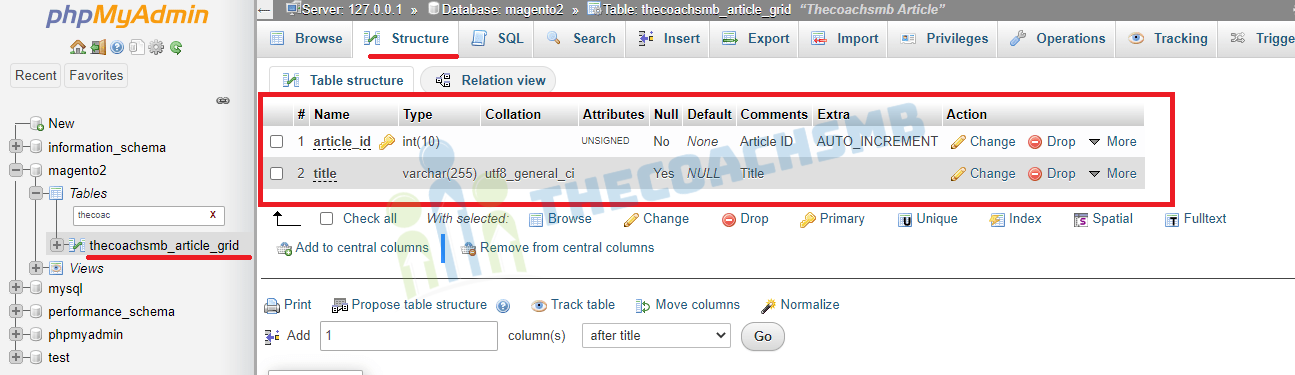
Here Table Name – thecoachsmb_article
Columns – article_id, title
<?xml version="1.0"?>
<schema xmlns:xsi="http://www.w3.org/2001/XMLSchema-instance"
xsi:noNamespaceSchemaLocation="urn:magento:framework:Setup/Declaration/Schema/etc/schema.xsd">
<table name="thecoachsmb_article_grid" resource="default" engine="innodb" comment="Thecoachsmb Article">
<column xsi:type="int" name="article_id" unsigned="true" nullable="false" identity="true" comment="Article ID"/>
<column xsi:type="varchar" name="title" nullable="true" length="255" comment="Title"/>
<constraint xsi:type="primary" referenceId="PRIMARY">
<column name="article_id"/>
</constraint>
</table>
</schema>
Now, run the below command to update this table in the databse:
php bin/magento setup:upgrade && php bin/magento setup:static-content:deploy -f
5. Create the Model file
After that, we will need to take care of the business logic and a single instance of object. So, let’s create Grid.php in app/code/Thecoachsmb/Grid/Model/Grid.php file
<?php
namespace Thecoachsmb\Grid\Model;

use Thecoachsmb\Grid\Api\Data\GridInterface;

class Grid extends \Magento\Framework\Model\AbstractModel implements GridInterface
{
    /**
     * CMS page cache tag.
     */
    const CACHE_TAG = 'thecoachsmb_article';

    /**
     * @var string
     */
    protected $_cacheTag = 'thecoachsmb_article';

    /**
     * Prefix of model events names.
     *
     * @var string
     */
    protected $_eventPrefix = 'thecoachsmb_article';

    /**
     * Initialize resource model.
     */
    protected function _construct()
    {
        $this->_init('Thecoachsmb\Grid\Model\ResourceModel\Grid');
    }
    /**
     * Get EntityId.
     *
     * @return int
     */
    public function getArticleId()
    {
        return $this->getData(self::ARTICLE_ID);
    }

    /**
     * Set EntityId.
     */
    public function setArticleId($articleId)
    {
        return $this->setData(self::ARTICLE_ID, $articleId);
    }

    /**
     * Get Title.
     *
     * @return varchar
     */
    public function getTitle()
    {
        return $this->getData(self::TITLE);
    }

    /**
     * Set Title.
     */
    public function setTitle($title)
    {
        return $this->setData(self::TITLE, $title);
    }
}
6. Now, Create the Interface file
Create GridInterface.php in app\code\Thecoachsmb\Grid\Api\Data folder.
<?php
namespace Thecoachsmb\Grid\Api\Data;

interface GridInterface
{
    /**
     * Constants for keys of data array. Identical to the name of the getter in snake case.
     */
    const ARTICLE_ID = 'article_id';
    const TITLE = 'title';

    /**
     * Get ArticleId.
     *
     * @return int
     */
    public function getArticleId();

    /**
     * Set ArticleId.
     */
    public function setArticleId($articleId);

    /**
     * Get Title.
     *
     * @return varchar
     */
    public function getTitle();

    /**
     * Set Title.
     */
    public function setTitle($title);
}
7. Create the Resource Model file
Now, for table ‘thecoachsmb_article_grid’, create the ResourceModel File
<?php
namespace Thecoachsmb\Grid\Model\ResourceModel;

/**
 * Grid Grid mysql resource.
 */
class Grid extends \Magento\Framework\Model\ResourceModel\Db\AbstractDb
{
    /**
     * @var string
     */
    protected $_idFieldName = 'article_id';
    /**
     * @var \Magento\Framework\Stdlib\DateTime\DateTime
     */
    protected $_date;

    /**
     * Construct.
     *
     * @param \Magento\Framework\Model\ResourceModel\Db\Context $context
     * @param \Magento\Framework\Stdlib\DateTime\DateTime       $date
     * @param string|null                                       $resourcePrefix
     */
    public function __construct(
        \Magento\Framework\Model\ResourceModel\Db\Context $context,
        \Magento\Framework\Stdlib\DateTime\DateTime $date,
        $resourcePrefix = null
    )
    {
        parent::__construct($context, $resourcePrefix);
        $this->_date = $date;
    }

    /**
     * Initialize resource model.
     */
    protected function _construct()
    {
        $this->_init('thecoachsmb_article_grid', 'article_id');
}
}
8. Create the Collection file Collection.php
In app/code/Thecoachsmb/Grid/Model/ResourceModel/Grid/Collection.php
<?php
namespace Thecoachsmb\Grid\Model\ResourceModel\Grid;

class Collection extends \Magento\Framework\Model\ResourceModel\Db\Collection\AbstractCollection
{
    /**
     * @var string
     */
    protected $_idFieldName = 'article_id';
    /**
     * Define resource model.
     */
    protected function _construct()
    {
        $this->_init('Thecoachsmb\Grid\Model\Grid', 'Thecoachsmb\Grid\Model\ResourceModel\Grid');
    }
}
9. Create Controller to display grid in the Menu – Grid Manager
Now, we will create controller file Index.php in app/code/Thecoachsmb/Grid/Controller/Adminhtml/Grid
<?php
namespace Thecoachsmb\Grid\Controller\Adminhtml\Grid;

class Index extends \Magento\Backend\App\Action
{
    /**
     * @var \Magento\Framework\View\Result\PageFactory
     */
    protected $_resultPageFactory;

    /**
     * @param \Magento\Backend\App\Action\Context        $context
     * @param \Magento\Framework\View\Result\PageFactory $resultPageFactory
     */
    public function __construct(
        \Magento\Backend\App\Action\Context $context,
        \Magento\Framework\View\Result\PageFactory $resultPageFactory
    )
    {
        parent::__construct($context);
        $this->_resultPageFactory = $resultPageFactory;
    }

    /**
     * Grid List page.
     *
     * @return \Magento\Backend\Model\View\Result\Page
     */
    public function execute()
    {
        /** @var \Magento\Backend\Model\View\Result\Page $resultPage */
        $resultPage = $this->_resultPageFactory->create();
        $resultPage->setActiveMenu('Thecoachsmbl_Grid::grid_list');
        $resultPage->getConfig()->getTitle()->prepend(__('Grid List'));

        return $resultPage;
    }

    /**
     * Check Grid List Permission.
     *
     * @return bool
     */
    protected function _isAllowed()
    {
        return $this->_authorization->isAllowed('Thecoachsmb_Grid::grid_list');
    }
}
10. Display Grid
Ceate layout file thecoachsmb_grid_index.xml in app/code/Thecoachsmb/Grid/view/adminhtml/layout
<?xml version="1.0"?>
<page xmlns:xsi="http://www.w3.org/2001/XMLSchema-instance" xsi:noNamespaceSchemaLocation="urn:magento:framework:View/Layout/etc/page_configuration.xsd">
    <body>
        <referenceContainer name="content">
                <!-- here we call our ui component of grid-->
        	<uiComponent name="thecoachsmb_grid_listing"/>
        </referenceContainer>
    </body>
</page>
11. Create ui component for grid row list.
We’ll create thecoachsmb_grid_listing.xml in app/code/Thecoachsmb/Grid/view/adminhtml/ui_component folder as following.
<?xml version="1.0" encoding="UTF-8"?>
<listing xmlns:xsi="http://www.w3.org/2001/XMLSchema-instance" xsi:noNamespaceSchemaLocation="urn:magento:framework:Ui/etc/ui_configuration.xsd">
    <argument name="data" xsi:type="array">
        <item name="js_config" xsi:type="array">
            <item name="provider" xsi:type="string">thecoachsmb_grid_listing.thecoachsmb_grid_listing_data_source</item>
            <item name="deps" xsi:type="string">thecoachsmb_grid_listing.thecoachsmb_grid_listing_data_source</item>
        </item>
        <item name="spinner" xsi:type="string">thecoachsmb_records_columns</item>
        <item name="buttons" xsi:type="array">
            <item name="add" xsi:type="array">
                <item name="name" xsi:type="string">add</item>
                <item name="label" xsi:type="string" translate="true">Add New Article</item>
                <item name="class" xsi:type="string">primary</item>
                <item name="url" xsi:type="string">*/*/addrow</item>
            </item>
        </item>
    </argument>
    <dataSource name="thecoachsmb_grid_listing_data_source">
        <argument name="dataProvider" xsi:type="configurableObject">
            <argument name="class" xsi:type="string">Magento\Framework\View\Element\UiComponent\DataProvider\DataProvider</argument>
            <argument name="name" xsi:type="string">thecoachsmb_grid_listing_data_source</argument>
            <argument name="primaryFieldName" xsi:type="string">article_id</argument>
            <argument name="requestFieldName" xsi:type="string">id</argument>
            <argument name="data" xsi:type="array">
                <item name="config" xsi:type="array">
                    <item name="update_url" xsi:type="url" path="mui/index/render"/>
                </item>
            </argument>
        </argument>
        <argument name="data" xsi:type="array">
            <item name="js_config" xsi:type="array">
                <item name="component" xsi:type="string">Magento_Ui/js/grid/provider</item>
            </item>
        </argument>
    </dataSource>
    <columns name="thecoachsmb_records_columns">
        <selectionsColumn name="ids">
           <argument name="data" xsi:type="array">
               <item name="config" xsi:type="array">
                   <item name="indexField" xsi:type="string">article_id</item>
                   <item name="sorting" xsi:type="string">desc</item>
                   <item name="sortOrder" xsi:type="number">0</item>
               </item>
           </argument>
       </selectionsColumn>
       <column name="article_id" sortOrder="20">
         <settings>
             <filter>textRange</filter>
             <label translate="true">ID</label>
             <sorting>asc</sorting>
         </settings>
       </column>
       <column name="title">
           <argument name="data" xsi:type="array">
               <item name="config" xsi:type="array">
                   <item name="filter" xsi:type="string">textRange</item>
                   <item name="label" xsi:type="string" translate="true">Title</item>
               </item>
           </argument>
       </column>
       <!-- Add Action with each row of grid and for this we will create a class Action -->
       <actionsColumn name="actions" class="Thecoachsmb\Grid\Ui\Component\Listing\Grid\Column\Action">
           <argument name="data" xsi:type="array">
               <item name="config" xsi:type="array">
                   <item name="resizeEnabled" xsi:type="boolean">false</item>
                   <item name="resizeDefaultWidth" xsi:type="string">107</item>
                   <item name="indexField" xsi:type="string">id</item>
               </item>
           </argument>
       </actionsColumn>
    </columns>
</listing>
12. Create di.xml file for map data provider with collection
In app/code/Thecoachsmb/Grid/etc/di.xml
<?xml version="1.0"?>
<config xmlns:xsi="http://www.w3.org/2001/XMLSchema-instance" xsi:noNamespaceSchemaLocation="urn:magento:framework:ObjectManager/etc/config.xsd">
    <preference for="Thecoachsmb\Grid\Api\Data\GridInterface" type="Thecoachsmb\Grid\Model\Grid" />

    <virtualType name="Thecoachsmb\Grid\Model\ResourceModel\Grid\Grid\Collection" type="Magento\Framework\View\Element\UiComponent\DataProvider\SearchResult">
        <arguments>
            <argument name="mainTable" xsi:type="string">thecoachsmb_article_grid</argument>
            <argument name="resourceModel" xsi:type="string">Thecoachsmb\Grid\Model\ResourceModel\Grid</argument>
        </arguments>
    </virtualType>
    <type name="Magento\Framework\View\Element\UiComponent\DataProvider\CollectionFactory">
        <arguments>
            <argument name="collections" xsi:type="array">
                <item name="thecoachsmb_grid_listing_data_source" xsi:type="string">Thecoachsmb\Grid\Model\ResourceModel\Grid\Grid\Collection</item>
            </argument>
        </arguments>
    </type>
</config>
13. Create Action Class Action.php
In app/code/Thecoachsmb/Grid/Ui/Component/Listing/Grid/Column/Action.php
<?php

namespace Thecoachsmb\Grid\Ui\Component\Listing\Grid\Column;

use Magento\Framework\View\Element\UiComponent\ContextInterface;
use Magento\Framework\View\Element\UiComponentFactory;
use Magento\Ui\Component\Listing\Columns\Column;
use Magento\Framework\UrlInterface;

class Action extends Column
{
    /** Url path */
    const ROW_EDIT_URL = 'thecoachsmb/grid/addrow';
    /** @var UrlInterface */
    protected $_urlBuilder;

    /**
     * @var string
     */
    private $_editUrl;

    /**
     * @param ContextInterface   $context
     * @param UiComponentFactory $uiComponentFactory
     * @param UrlInterface       $urlBuilder
     * @param array              $components
     * @param array              $data
     * @param string             $editUrl
     */
    public function __construct(
        ContextInterface $context,
        UiComponentFactory $uiComponentFactory,
        UrlInterface $urlBuilder,
        array $components = [],
        array $data = [],
        $editUrl = self::ROW_EDIT_URL
    )
    {
        $this->_urlBuilder = $urlBuilder;
        $this->_editUrl = $editUrl;
        parent::__construct($context, $uiComponentFactory, $components, $data);
    }

    /**
     * Prepare Data Source.
     *
     * @param array $dataSource
     *
     * @return array
     */
    public function prepareDataSource(array $dataSource)
    {
        if (isset($dataSource['data']['items'])) {
            foreach ($dataSource['data']['items'] as &$item) {
                $name = $this->getData('name');
                if (isset($item['article_id'])) {
                    $item[$name]['edit'] = [
                        'href' => $this->_urlBuilder->getUrl(
                            $this->_editUrl,
                            ['id' => $item['article_id']]
                        ),
                        'label' => __('Edit'),
                    ];
                }
            }
        }

        return $dataSource;
    }
}
14. Now we’ll start how to save/edit data in table using form
Above in our Ui component file thecoachsmb_grid_listing.xml we already add path of add form url now we’ll create controller file AddRow.php in app/code/Thecoachsmb/Grid/Controller/Adminhtml/Grid
<?php
namespace Thecoachsmb\Grid\Controller\Adminhtml\Grid;

use Magento\Framework\Controller\ResultFactory;

class AddRow extends \Magento\Backend\App\Action
{
    /**
     * @var \Magento\Framework\Registry
     */
    private $coreRegistry;

    /**
     * @var \Thecoachsmb\Grid\Model\GridFactory
     */
    private $gridFactory;

    /**
     * @param \Magento\Backend\App\Action\Context $context
     * @param \Magento\Framework\Registry $coreRegistry,
     * @param \Thecoachsmb\Grid\Model\GridFactory $gridFactory
     */
    public function __construct(
        \Magento\Backend\App\Action\Context $context,
        \Magento\Framework\Registry $coreRegistry,
        \Thecoachsmb\Grid\Model\GridFactory $gridFactory
    ) {
        parent::__construct($context);
        $this->coreRegistry = $coreRegistry;
        $this->gridFactory = $gridFactory;
    }

    /**
     * Mapped Grid List page.
     * @return \Magento\Backend\Model\View\Result\Page
     */
    public function execute()
    {
        $rowId = (int) $this->getRequest()->getParam('id');
        $rowData = $this->gridFactory->create();
        /** @var \Magento\Backend\Model\View\Result\Page $resultPage */
        if ($rowId) {
           $rowData = $rowData->load($rowId);
           $rowTitle = $rowData->getTitle();
           if (!$rowData->getArticleId()) {
               $this->messageManager->addError(__('row data no longer exist.'));
               $this->_redirect('thecoachsmb/grid/rowdata');
               return;
           }
       }

       $this->coreRegistry->register('row_data', $rowData);
       $resultPage = $this->resultFactory->create(ResultFactory::TYPE_PAGE);
       $title = $rowId ? __('Edit Row Data ').$rowTitle : __('Add Row Data');
       $resultPage->getConfig()->getTitle()->prepend($title);
       return $resultPage;
    }

    protected function _isAllowed()
    {
        return $this->_authorization->isAllowed('Thecoachsmb_Grid::add_row');
    }
}
15. Create layout file thecoachsmb_grid_addrow.xml to display the form
For render this form create layout file thecoachsmb_grid_addrow.xml in app/code/Thecoachsmb/Grid/view/adminhtml/layout
<?xml version="1.0"?>
<page xmlns:xsi="http://www.w3.org/2001/XMLSchema-instance" layout="admin-1column"
      xsi:noNamespaceSchemaLocation="urn:magento:framework:View/Layout/etc/page_configuration.xsd">
    <body>
        <referenceContainer name="content">
           <block class="Thecoachsmb\Grid\Block\Adminhtml\Grid\AddRow" name="add_row" />
        </referenceContainer>
    </body>
</page>
16. Add Insert Action
Create block file of form AddRow.php in app/code/Thecoachsmb/Grid/Block/Adminhtml/Grid
<?php
namespace Thecoachsmb\Grid\Block\Adminhtml\Grid;

class AddRow extends \Magento\Backend\Block\Widget\Form\Container
{
    /**
     * Core registry.
     *
     * @var \Magento\Framework\Registry
     */
    protected $_coreRegistry = null;

    /**
     * @param \Magento\Backend\Block\Widget\Context $context
     * @param \Magento\Framework\Registry           $registry
     * @param array                                 $data
     */
    public function __construct(
        \Magento\Backend\Block\Widget\Context $context,
        \Magento\Framework\Registry $registry,
        array $data = []
    )
    {
        $this->_coreRegistry = $registry;
        parent::__construct($context, $data);
    }

    /**
     * Initialize Imagegallery Images Edit Block.
     */
    protected function _construct()
    {
        $this->_objectId = 'row_id';
        $this->_blockGroup = 'Thecoachsmb_Grid';
        $this->_controller = 'adminhtml_grid';
        parent::_construct();
        if ($this->_isAllowedAction('Thecoachsmb_Grid::add_row')) {
            $this->buttonList->update('save', 'label', __('Save'));
        } else {
            $this->buttonList->remove('save');
        }
        $this->buttonList->remove('reset');
    }

    /**
     * Retrieve text for header element depending on loaded image.
     *
     * @return \Magento\Framework\Phrase
     */
    public function getHeaderText()
    {
        return __('Add Article Data');
    }

    /**
     * Check permission for passed action.
     *
     * @param string $resourceId
     *
     * @return bool
     */
    protected function _isAllowedAction($resourceId)
    {
        return $this->_authorization->isAllowed($resourceId);
    }

    /**
     * Get form action URL.
     *
     * @return string
     */
    public function getFormActionUrl()
    {
        if ($this->hasFormActionUrl()) {
            return $this->getData('form_action_url');
        }

        return $this->getUrl('*/*/save');
    }
}
17. Create Edit Form
Create block file of form with field Form.php in app/code/Thecoachsmb/Grid/Block/Adminhtml/Grid/Edit
<?php
namespace Thecoachsmb\Grid\Block\Adminhtml\Grid\Edit;

class Form extends \Magento\Backend\Block\Widget\Form\Generic
{
    /**
     * @var \Magento\Store\Model\System\Store
     */
    protected $_systemStore;

    /**
     * @param \Magento\Backend\Block\Template\Context $context
     * @param \Magento\Framework\Registry             $registry
     * @param \Magento\Framework\Data\FormFactory     $formFactory
     * @param array                                   $data
     */
    public function __construct(
        \Magento\Backend\Block\Template\Context $context,
        \Magento\Framework\Registry $registry,
        \Magento\Framework\Data\FormFactory $formFactory,
        array $data = []
    )
    {
        parent::__construct($context, $registry, $formFactory, $data);
    }

    /**
     * Prepare form.
     *
     * @return $this
     */
    protected function _prepareForm()
    {
        $dateFormat = $this->_localeDate->getDateFormat(\IntlDateFormatter::SHORT);
        $model = $this->_coreRegistry->registry('row_data');
        $form = $this->_formFactory->create(
            ['data' => [
                            'id' => 'edit_form',
                            'enctype' => 'multipart/form-data',
                            'action' => $this->getData('action'),
                            'method' => 'post'
                        ]
            ]
        );

        $form->setHtmlIdPrefix('smb_');
        if ($model->getArticleId()) {
            $fieldset = $form->addFieldset(
                'base_fieldset',
                ['legend' => __('Edit Article Data'), 'class' => 'fieldset-wide']
            );
            $fieldset->addField('article_id', 'hidden', ['name' => 'article_id']);
        } else {
            $fieldset = $form->addFieldset(
                'base_fieldset',
                ['legend' => __('Add Article Data'), 'class' => 'fieldset-wide']
            );
        }

        $fieldset->addField(
            'title',
            'text',
            [
                'name' => 'title',
                'label' => __('Title'),
                'id' => 'title',
                'title' => __('Title'),
                'class' => 'required-entry',
                'required' => true,
            ]
        );

        $form->setValues($model->getData());
        $form->setUseContainer(true);
        $this->setForm($form);

        return parent::_prepareForm();
    }
}
18. Save Data in the Database
Create Save.php in app/code/Thecoachsmb/Grid/Controller/Adminhtml/Grid for save record
<?php

namespace Thecoachsmb\Grid\Controller\Adminhtml\Grid;

class Save extends \Magento\Backend\App\Action
{
    /**
     * @var \Thecoachsmb\Grid\Model\GridFactory
     */
    var $gridFactory;

    /**
     * @param \Magento\Backend\App\Action\Context $context
     * @param \Thecoachsmb\Grid\Model\GridFactory $gridFactory
     */
    public function __construct(
        \Magento\Backend\App\Action\Context $context,
        \Thecoachsmb\Grid\Model\GridFactory $gridFactory
    ) {
        parent::__construct($context);
        $this->gridFactory = $gridFactory;
    }

    /**
     * @SuppressWarnings(PHPMD.CyclomaticComplexity)
     * @SuppressWarnings(PHPMD.NPathComplexity)
     */
    public function execute()
    {
        $data = $this->getRequest()->getPostValue();
        if (!$data) {
            $this->_redirect('thecoachsmb/grid/addrow');
            return;
        }
        try {
            $rowData = $this->gridFactory->create();
            $rowData->setData($data);
            if (isset($data['id'])) {
                $rowData->setEntityId($data['id']);
            }
            $rowData->save();
            $this->messageManager->addSuccess(__('Row data has been successfully saved.'));
        } catch (\Exception $e) {
            $this->messageManager->addError(__($e->getMessage()));
        }
        $this->_redirect('thecoachsmb/grid/index');
    }

    /**
     * @return bool
     */
    protected function _isAllowed()
    {
        return $this->_authorization->isAllowed('Thecoachsmb_Grid::save');
    }
}
That’s it.